 By
By Thanks to its new PCIe interface, the Raspberry Pi 5 is finally capable of booting from NVMe drives and connecting expansion hardware that previous generations simply couldn’t support. On paper, that makes it look like an interesting platform for a low-power NAS. I bought one to find out whether that was actually true.
As a long-time Raspberry Pi enthusiast owning multiple generations, I was eager to test the Pi 5’s new PCIe lane for home storage. This new feature opens the door to connecting a variety of peripherals to the Raspberry Pi 5, greatly expanding its potential use cases. Some people have even tried pairing it with a discrete GPU, spoiler alert: without much success.
What interested me the most, however, was the possibility of using it as a NAS. I abandoned that idea fairly quickly after taking a closer look at its specifications. In my opinion, a proper NAS should have at least the following characteristics:
- At least 8GB of RAM;
- NVMe boot support, preferably with two drives;
- The ability to install at least two 3.5″ hard drives, configured with ZFS on TrueNAS;
- At least one 2.5Gbps Ethernet port;
- At least one SFP+ port.
On top of that, if I’m going to build a NAS around a Raspberry Pi 5, it also needs to make financial sense compared to the available alternatives. In other words, the Raspberry Pi shouldn’t simply be capable of acting as a NAS, it should also be competitive with the hardware that’s already available on the market.
Let’s go through each point.
RAM
As is well known, the Raspberry Pi doesn’t allow memory upgrades. If you buy the 4GB model, you’re stuck with 4GB; if you buy the 8GB model, you get 8GB—no more, no less. Compared to the available alternatives, this is definitely a disadvantage.
The NVMe Drive
This is where the PCIe interface comes into play, along with the first important consideration about it, which will also become one of the key points throughout this analysis.
The Raspberry Pi 5 exposes a PCIe 2.0 x1 interface, although unofficially it can often be configured to run at PCIe Gen 3 speeds. In theory, this means a maximum bandwidth of 8 GT/s, equivalent to roughly 985 MB/s.
This makes it perfectly possible to boot from an NVMe SSD. However, even a modest PCIe Gen 3 NVMe drive can reach around 2,400 MB/s in read speeds and 1,100 MB/s in write speeds, meaning the PCIe interface itself becomes the bottleneck long before the SSD reaches its full potential.
Additional Storage
Installing additional drives isn’t as straightforward as simply adding an M.2 adapter for the boot NVMe, because doing so would consume virtually the only high-speed expansion interface available.
Fortunately, the market offers M.2 splitters that support two or even four NVMe drives. Unfortunately, there’s a catch: the single PCIe x1 lane has to be shared among all connected devices.
That means you can install either two M.2 drives or four M.2 drives, but in the first case they’ll effectively operate as PCIe Gen 2 devices, while in the second they’ll be limited to Gen 1 speeds, offering maximum transfer rates of roughly 500 MB/s and 250 MB/s respectively.
As you’ve probably already guessed, this doesn’t make much sense. A SATA III interface already supports up to 600 MB/s, so regardless of the configuration, the PCIe slot becomes the bottleneck for every connected drive.
High-Speed Networking: 2.5GbE and SFP+ Limitations
A proper NAS often relies on fast network throughput to serve multiple clients or handle large file transfers. Unfortunately, high-speed networking is another major hurdle for the Raspberry Pi 5.
- 2.5Gbps Ethernet: Since the single PCIe lane is already needed for storage expansion, adding a PCIe-based 2.5GbE Network Interface Card (NIC) isn’t practical. The only realistic workaround is using a USB 3.0 to 2.5Gbps Ethernet adapter. While performance is generally decent, USB adapters introduce additional CPU overhead and slightly higher idle power consumption compared to native network controllers.
- 10Gbps SFP+: Adding an SFP+ port is, for all practical purposes, impossible. A 10Gbps connection demands bandwidth that far exceeds what the Pi 5’s system architecture and single PCIe lane can realistically support.
Why this matters: Out of the box, the Raspberry Pi 5 comes with a standard Gigabit Ethernet port, capping real-world transfer speeds at around 110 MB/s. If you stay on Gigabit Ethernet, the network itself becomes your main bottleneck long before your NVMe or SATA storage even breaks a sweat. Upgrading to 2.5GbE via USB helps, but it adds another adapter to the total cost and power budget.
Cost and the Alternatives
Let’s now talk about costs and whether building such a NAS is actually worthwhile.
To assemble a Raspberry Pi-based NAS, I’d have to compromise on memory capacity, the number and speed of mechanical hard drives, the number of NVMe drives, the availability of an SFP+ port, and even the number of 2.5Gbps network interfaces.
Excluding mechanical hard drives, the estimated cost would be:
- Raspberry Pi 5: €89.00
- 27W Power Supply: €17.00
- Active Cooler: €11.00
- Dual NVMe Adapter: €28.00
- 256GB NVMe SSD: €25.00
- SATA III Adapter: €40.00
- USB 3.0 to 2.5Gbps Ethernet Adapter: €22.00
Total: €232.00
At this point, the obvious question becomes: is it still worth it? Spending over €230 before even buying the hard drives means you’re already entering the price range of much more capable hardware.
That said, there’s another aspect worth considering. With a standard 1Gbps Ethernet port, the kind found on most consumer motherboards, you’ll typically max out at around 110 MB/s of real-world transfer speed. In other words, in many scenarios the actual bottleneck isn’t the storage subsystem at all, but the network.
Even after upgrading to a 2.5Gbps Ethernet adapter like the one listed above, the network still remains slower than the theoretical read and write speeds of the storage, assuming only one client is accessing the NAS at a time. So, depending on the intended workload, the compromise may actually be acceptable.
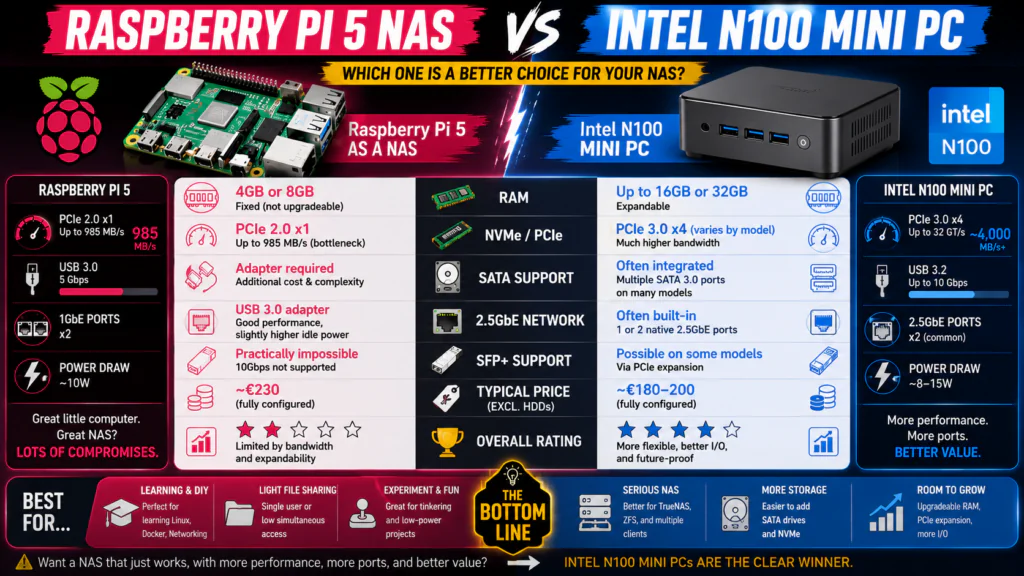
The real issue is that the market already offers significantly better and often cheaper alternatives than the Raspberry Pi. A good example is the growing number of Intel N100-based mini PCs. They usually come with more RAM, allow future memory upgrades, and often include two or more 2.5Gbps Ethernet ports or multiple SATA III ports out of the box. They’re also frequently priced below €200, and some models even provide a faster PCIe interface than the Raspberry Pi 5.
When Does a Raspberry Pi 5 NAS Still Make Sense?
Despite all these limitations, there are still situations where a Raspberry Pi 5 can make sense as a NAS. If you already own one, only need basic file sharing, have a single NVMe drive, and don’t expect multiple clients saturating the network simultaneously, it can be an enjoyable DIY project.
For learning Linux, Docker, network storage, or simply experimenting with low-power hardware, it’s still a fantastic platform.
However, if you’re building a NAS from scratch and buying all the hardware today, I’d seriously consider Intel N100-based systems before investing in the Raspberry Pi ecosystem.
Conclusion
From my point of view, the Raspberry Pi remains a fantastic little machine but for different kinds of projects. If you’re planning to build a NAS, I’d recommend looking at alternative solutions, or even buying a pre-built NAS instead. The Raspberry Pi 5 is still an excellent platform for Docker, Home Assistant, or retro gaming through projects like RetroPie, Batocera, and similar distributions. But when it comes to building a NAS, personally, I’d rather choose something else.